User guide · Chapter 8
Payments and the payment log
Native Rent User Guide 1.2 (2026-10-23). Supersedes the published guide.
Flow NR_Payment_Screen (label Payment) runs from the rental.
Payment object and transaction fields
The Payment object records payment transaction details, including gateway information and API responses (package 1.89). Related payment transaction information fields on the rental improve tracking and visibility of payment details. This is separate from the Payment Log, which is the audit row created each time you save from the Record Payment screen.
Record Payment screen
- Left: rental details. Right: Rental Total, Total Paid to Date, Amount due (shown as Credit when negative).
- Enter Amount Received Now (blank counts as 0), Payment Method and Payment Status.
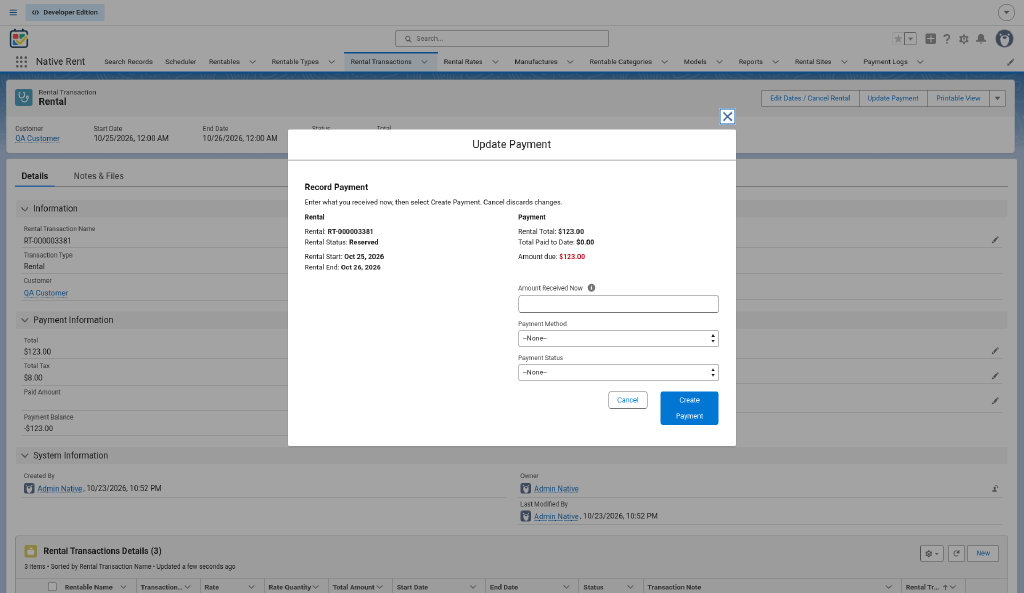
Rules
- A negative amount, or an amount with no Payment Method, shows an error.
- Paying more than the Total shows a warning but saves (unless status is Refunded).
- Status left unchanged becomes Success when fully paid, or Partial when part paid.
- Is Fully Paid is set when paid is at least the Total.
- Cancel saves nothing and is never blocked.
Payment log
- Each save creates one Payment Log with amount, method, status, date and the paid total before and after.
- A zero amount logs only when the status changed.
- If the log fails, Payment Log Not Saved shows. The payment itself is kept.
- If the rental save fails, Payment Not Saved shows. Previous returns without double-counting.
Source: process-map.md Payment path; decision-log.md 2026-10-21; customer release email 2026-08-06 (1.89 Payment object).