User guide · Chapter 4
Rental rates
Native Rent User Guide 1.2 (2026-10-23). Supersedes the published guide.
A Rental Rate is a price or fee linked to one Rentable.
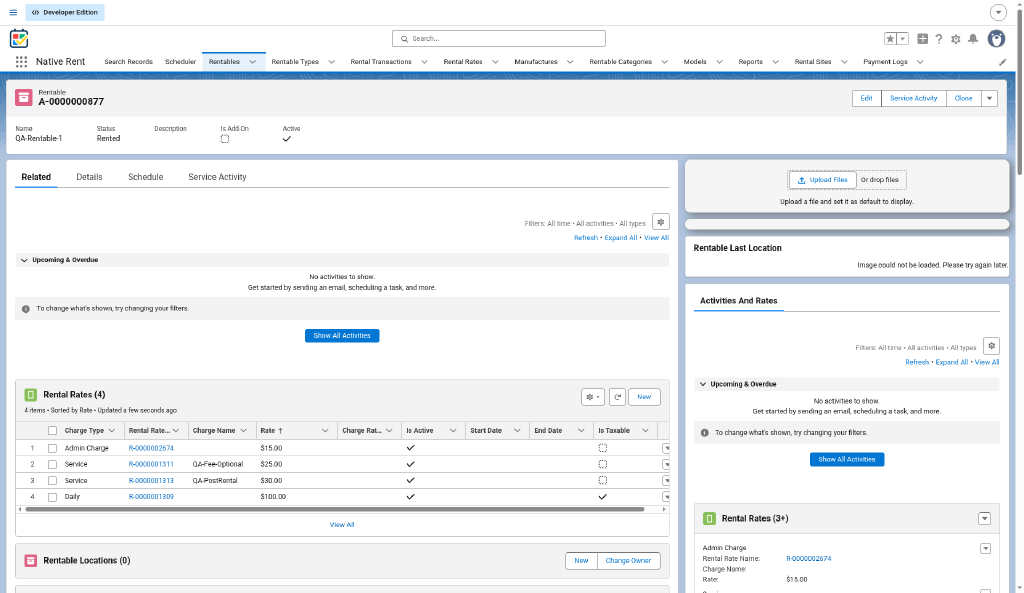
Fields
| Field | Meaning |
|---|---|
| Charge Type | Hourly, Daily, Weekly, Monthly, Yearly for time rates. Tax, Admin Charge and Service for fees. A new charge line copies it into Transaction Type. For tax lines to work, add Tax to the Charge Type picklist value set in Setup (package 1.86). |
Charge Name (Charge_Name__c) | The name shown for a fee, for example Cleaning Fee. If it is blank on an Admin Charge, Service or Tax rate, rental lines show the charge type plus the rate number (for example "Service R-0000001620"); on other rates it stays blank. See chapter 7. |
Rate (Rate__c) | The amount. |
Charge Rate % (Charge_Rate_Percentile__c) | Used when Rate is blank. The amount is the percent of the rental Total. 8 means 8%. |
| Is Taxable | When checked, lines from this rate are included in tax calculations (for example at check-in). Leave unchecked for tax-exempt services, fees, or asset types. Booking shows it in an Is Taxable column. Source: customer release email 1.86. |
| Charge Due | When the charge applies. Post-Rental rates are offered at check-in as post-rental charges. Extra time uses Pre-Rental rates only. |
| Required | A required fee is added to every booking of the Rentable. |
| One Time Charge | Charged once, not per unit of time. |
| Rate Notes | Free notes. Shown in the post-rental charge table. |
| Active | Only active rates are used. |
Line amount
Total Amount = rate x quantity - discount.
Rate quantity for alternate rates
When a booking uses another rate type: Hourly uses hours, Daily days, Weekly days/7, Monthly days/30, Yearly days/365.
Tax rate
Tax uses the Rental Site Tax Rate (a percent field) for the selected site during the rental process. An active Tax-type rate is named in the tax line note. See chapter 7.
By Model Create/Update Rates
Generate or modify all Rentable rates by model: change by percentage or set a specific rate amount (package 1.89). Useful when a whole model line needs the same price update.
Daily fee proration
Daily fee proration accounts for rentals that start or end mid-day so charges stay accurate (fix in package 1.86).
Fields the published guide adds (Is Best Rate, Start Date, End Date, "next best rate" suggestions) are in chapter 15. Source: published guide / AA; not in repo source.
The per-rate Pro-Rating checkbox is not built. See chapter 16.
Source: decision-log.md 2026-10-19 to 2026-10-22; process-map.md; customer release email 2026-08-06 (1.86, 1.89).