User guide · Chapter 3
Rentables
Native Rent User Guide 1.2 (2026-10-23). Supersedes the published guide.
A Rentable is any one item you rent out.
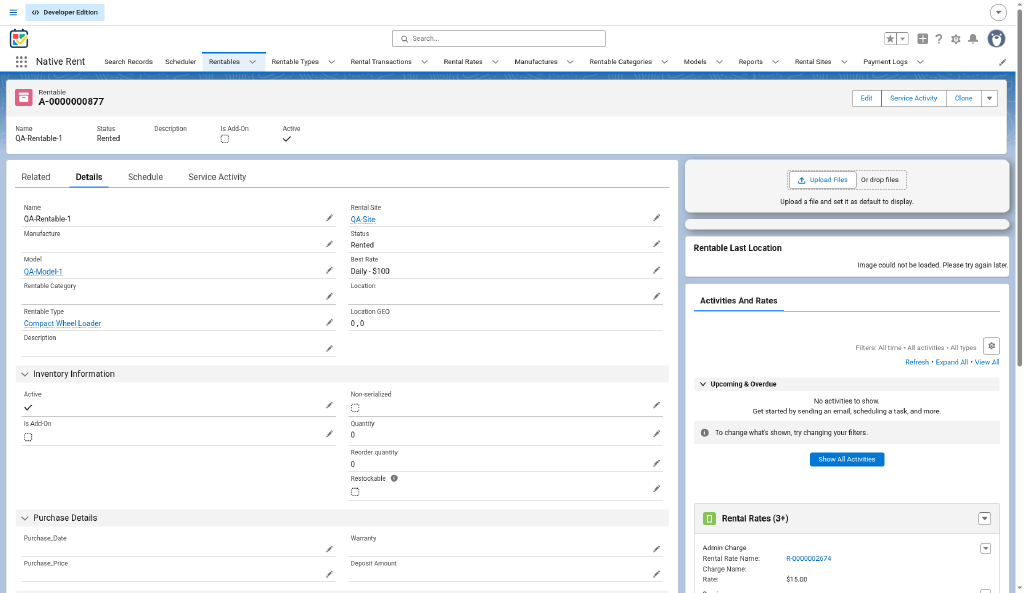
Key fields from the repo
- Is Add-On: the Rentable is an add-on to a main Rentable.
- Quantity (shown as In Stock on booking screens): stock for non-serialized add-ons.
- Restockable (
Restockable__c, default off): marks an add-on that goes back into stock at check-in. No live step reads it yet (see chapter 16). Hidden until the Native Rent permission set (Check_In) or View All Fields is granted. - Rental Site lookup: link the Rentable to its primary Rental Site (storage, pickup, or default drop-off). Improves visibility and logistics across multiple sites. Source: customer release email 1.86.
Add-on stock today (Multi_Rental_process v19)
- Each non-serialized add-on asks for Add-On Quantity (1 or more). Serialized add-ons stay at 1.
- One rental line is created per unit.
- Stock goes down by the units booked, even below 0. Blank counts as 0. Example: -4 with 2 units gives -6.
- A warning shows when stock is 0, negative or blank. The booking is still allowed.
- Negative stock shows in the report NR_Overbooked_Rentables.
Other fields
The published guide lists Name, Manufacturer, Model, Description, Photo, Rentable Category, Rentable Type, Serial Number, Purchase Date, Purchase Price, Deposit Amount, Warranty Expiry Date, Status, Best Rate, Location GEO and QR Code. Source: published guide / AA; not in repo source. See chapter 15.
Native Image Management
The Native Image Management component supports multiple image uploads and display on desktop or Native Rent mobile (package 1.84). When view_mode=images, clicking an image opens a preview overlay.
Configuration options (comma-separated example):
min_images_to_upload=3, image_types=(LEFT;RIGHT;BACK;FRONT), image_title_mode=number, show_description=true, view_mode=images, view_size=4, first_default_image=true
| Parameter | What it does |
|---|---|
min_images_to_upload | Minimum number of required images. |
image_types | Custom categories (example: LEFT;RIGHT;BACK;FRONT). |
image_title_mode | Display titles by filename or sequential number. |
show_description | Show or hide image descriptions. |
first_default_image | Set the first uploaded image as default. |
hide_default_image_checkbox | Hide the default-image checkbox. |
view_mode | default, images (gallery), or fieldset API (images plus fields). |
view_size | How many images display per row in gallery or fieldset mode. |
Source: customer release email 1.84.
US driver’s license barcode scanner (mobile)
On Native Rent mobile, staff can scan a U.S. driver’s license barcode to populate renter/guest fields at check-in or check-out. Speeds data entry and reduces typing errors for customer-facing rental workflows. Source: customer release email 1.89. See also chapter 10.
Rental Transactions button
On a Rentable, Rental Transactions lists open rentals that include this Rentable (customer name, rental name, status, dates, total). Pick one to review its lines, then continue to check-out or check-in the same way as from a Contact. Completed and Cancelled rentals are not listed.
Source: decision-log.md 2026-10-22, 2026-10-24; customer release email 2026-08-06 (Rental Site, Image Management, barcode scanner).