User guide · Chapter 14
Search
Native Rent User Guide 1.2 (2026-10-23). Supersedes the published guide. Covers Native Rent package version 1.95 Search Records interface.
Global search
Rental Transactions and Rental Transaction Details are searchable.
- Rental Transaction results show Status, Customer, Start Date, End Date, Total.
- Rental Transaction Detail results show Status, Rental Transaction, Rentable, Start Date, End Date.
Source: decision-log.md 2026-10-22 (deploy 0Afa500002TKRDdCAP).
Search Records page
Search Records uses the Native Search Records component. Staff find Rentables with custom filters and result columns, then start booking (multi-select into a flow) or open a record or another flow from an action button.
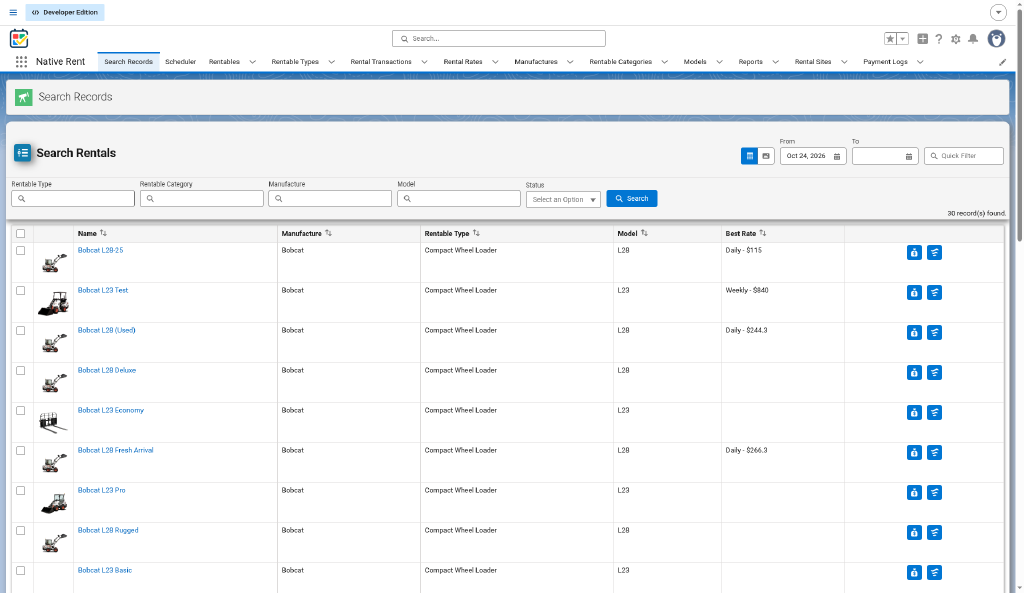
Field sets on Rentable
Setup → Object Manager → Rentable → Field Sets:
- Filter Fields — which fields appear as search filters. Add, remove, or reorder fields.
- List Fields — which columns appear in the results list. Add, remove, or reorder fields.
Tailor filters for location, rates, status, category, type, and other Rentable fields your org uses. Tailor list columns the same way.
Photos, dates, and booking
- Results can show a Rentable photo (Rentable Photo / Default Image).
- Date filters support the booking window you choose.
- Start Rental (or your label) and multi-select send selected Rentables into the booking flow. Current booking uses Multi_Rental_process. The published guide example also showed
nativerent__Find_Rentable_Ratesas an action; [UNVERIFIED] whether that flow still exists in packaging. Prefer Multi_Rental_process for booking (see chapter 15 corrections).
Clone the page
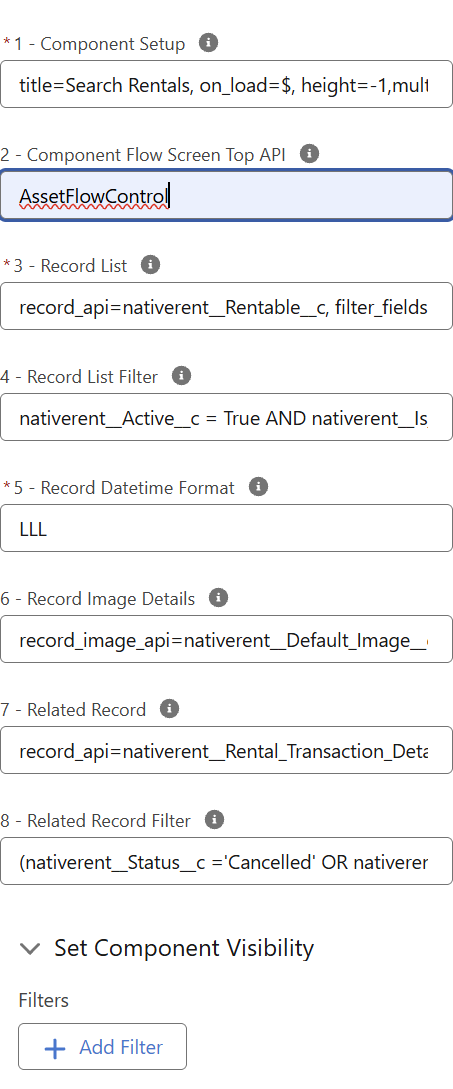
Clone the Search Records Lightning page into a custom app. Edit the Native Search Records component properties on that page to change title, the controlling screen flow (line 2), filters, list, images, actions, and list filter.
Key component parameters
Plain language and API names (Source: published guide / AA). Grouped like the component designer.
1 — Component setup
| Parameter | What it does |
|---|---|
title | Heading on the page (example: Search Rentals). |
title_size | Title font size in pixels. |
icon | Icon next to the title. |
icon_scale | Icon size (for example small or medium). |
height | Component height; -1 can mean fill available space. |
language | Language code (for example en). |
on_load | $ = run search automatically when the page loads. |
multi_select_flow | Flow API name for selected rows (packaging example: nativerent__Multi_Rental_process). |
multi_select_flow_label | Button label (example: Start Rental). |
multi_select_flow_checkboxes | Show checkboxes for multi-select. |
hide_filters | Set hide_filters=true to hide the filter line (package 1.90). |
view_mode | Results layout: table, images, or both (example: view_mode=both). From package 1.78. |
view_size | Positive number — image tiles across (example: view_size=5). |
view_default | Starting view when view_mode=both: table or images. |
2 — Component Flow Screen Top API
The screen flow API name for this component. That flow can modify any configuration line in real time and push values into the component (query and visuals included). Package 1.90. Example: AssetFlowControl. Leave blank if you are not using a controlling screen flow.
3 — Record list
| Parameter | What it does |
|---|---|
record_api | Object to search (Rentable: nativerent__Rentable__c). |
filter_fieldset / list_fieldset | Filter Fields and List Fields field set API names. |
filter_logic | Combine filters with and or or. |
action_button | @ opens the record, or a flow API name. Published-guide example used nativerent__Find_Rentable_Rates [UNVERIFIED in packaging]. |
action_button_label / icon / size / helptext | Label and icon for the action. A second action can open another flow (packaging example: Multi_Rental_process). |
4 — Record List Filter
A filter statement on the list. Packaging example: Active, not Add-On, and has active rates — nativerent__Active__c = True AND nativerent__Is_Add_On__c = False AND nativerent__Number_of_Active_Rates__c > 0.
5 — Record Datetime Format
How DateTime fields show in the list (default example LLL). This line can also take thumbnail sizing: image_height= a positive number in pixels (example: image_height=70, package 1.78).
6 — Record Image Details
record_image_api, alt_text_api, image_width — image field, alt text, and width. Leave blank to turn photos off.
7 — Related Record
Optional related rows under a Rentable (for example rental lines): record_api, label_field, related/from/to fields, filters.
Flexibility
- Change which attributes staff filter on via Filter Fields.
- Change result columns via List Fields.
- Turn images on or off; set image and alt fields.
- Choose which flow the multi-select or action button opens.
- Point line 2 at a screen flow API name so that flow can modify any config line and push query/visual changes at runtime (1.90).
- Hide the filter line with
hide_filters=truein Component setup (1.90). - Switch results between table, images, or both with
view_mode/view_size/view_default, and set thumbnail height withimage_heighton line 5 (1.78). - Narrow the whole list with Record List Filter.
- Show related rental lines when related-record config is set.
- Put the page in your own app and restyle the title, icon, and height.
Source: published guide / AA; packaging Search Records Lightning page examples; AA customer email 2026-08-06 (1.90 / 1.78 Search config); decision-log.md 2026-10-22. Scheduler is Native Planner — see chapter 1.