

Native Rent
Vehicle and Fleet Rental in Salesforce
Native Rent runs car, tractor, and mixed fleet hire on Salesforce Rentables. Booking, checkout, check-in, rates, and payments stay in the same org as your accounts and service work, whether you rent passenger vehicles, Bobcats, or farm equipment.
Vehicle rental how-to · User guide · Equipment rental
Fleet and vehicle rental without a side system
Object names stay generic (Rentable, Rental Rate, Rental Transaction). You use local words like car or tractor in layouts and reports, not by renaming packaged labels. That keeps one rental stack for mixed catalogs: passenger cars next to heavy equipment when your business needs both.
- Overlap checks so conflicting vehicle bookings are visible and blocked
- Flexible rates from hourly through yearly, with fees and deposits
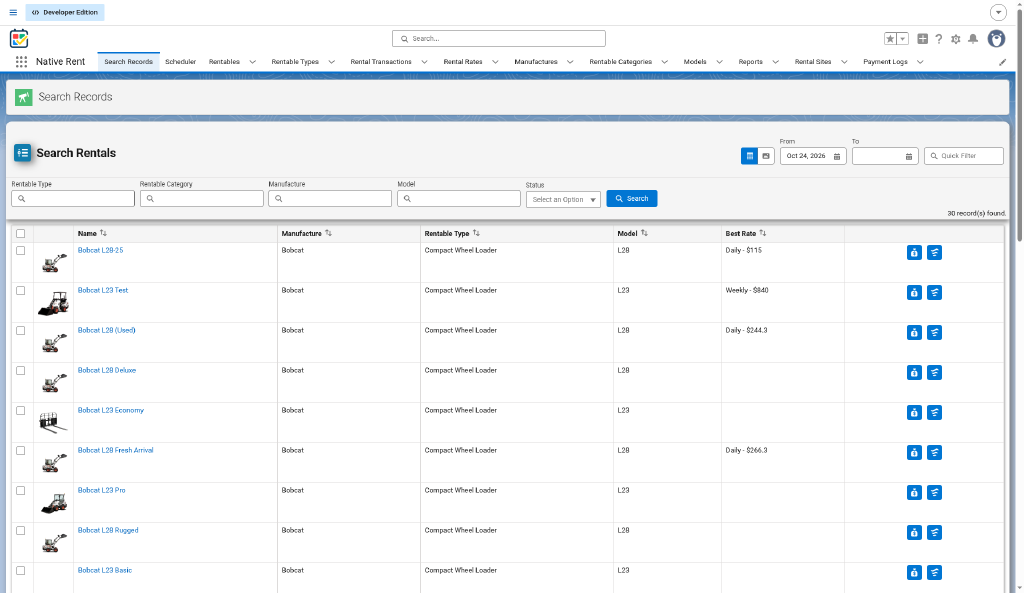
- Search with photos and a visual scheduler for timelines
- Mobile check-out and check-in, including U.S. driver's license barcode scan where you use it
- Damage photos, payment log, and utilization dashboards
- Rentable Location support, including GPS coordinates and QR codes where you use them
How a vehicle rental runs
- Create Rentables and rates for the vehicles or fleet units you hire out.
- Book from Search or the visual scheduler, with add-ons and fees as needed.
- Check out the unit when it leaves.
- Check in on return: extra time and damage charges apply when configured.
- Record payments and review ops dashboards.
A full sample path for cars and tractors is in the car and tractor working-system how-to. Package settings for date-and-time mode and grace hours are in Setup and Settings.
FAQ
Can I rent cars and heavy equipment in the same org?
Yes. Native Rent uses generic Rentables, so one model fits vehicle rental, equipment rental, and mixed catalogs. Shape categories, types, and Flows for each desk.
Does checkout work on Salesforce Mobile?
Yes. Native Rent supports Salesforce Mobile, including check-out and check-in flows with license barcode scan and Rentable photos.
Can I charge for late returns?
Check-in adds an extra-time charge when the return is late under your settings.