

Native Rent
Event, Party, and Venue Rental in Salesforce
Book event gear and venues, from tents, linens, and AV to party rooms, holiday party spaces, and gardens, in the same Salesforce org as your accounts and payments. Native Rent keeps the catalog, availability, checkout, check-in, and the payment log next to the customer record, so a weekend wedding or a three-day conference is not tracked in a side spreadsheet.
Equipment rental · Vehicle rental · Tool rental how-to · User guide
What event rental teams use Native Rent for
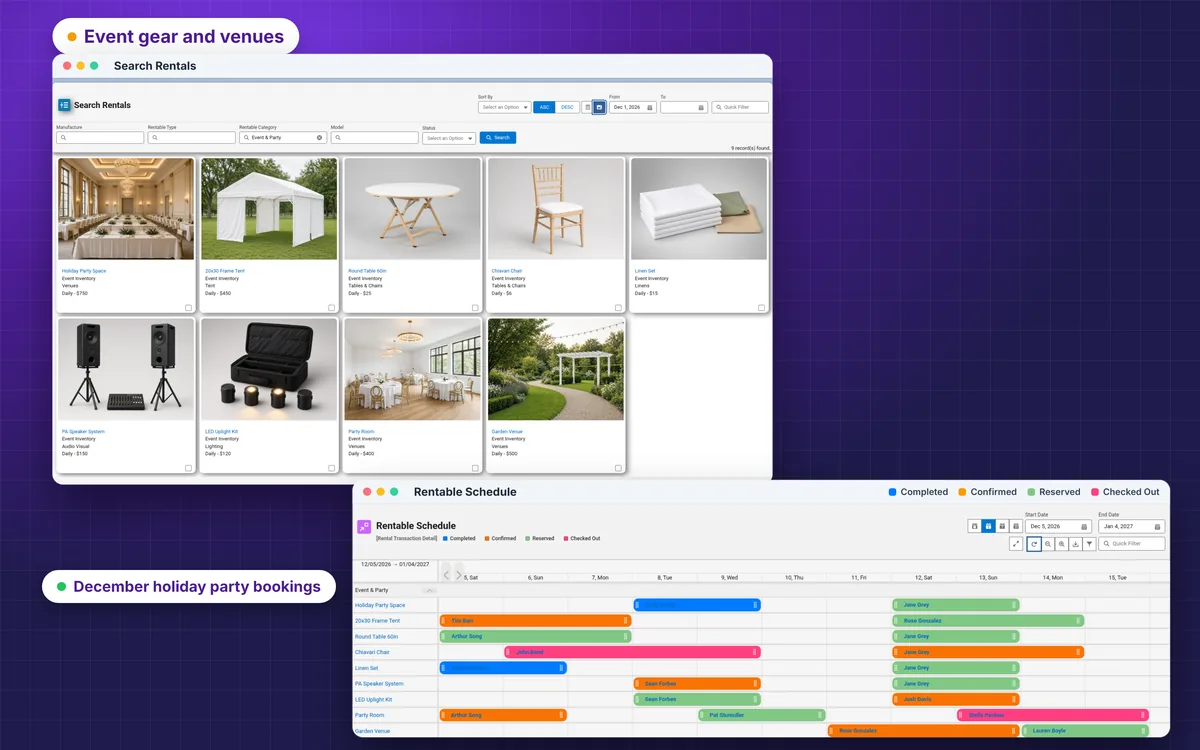
Event and party desks hire out a mix of serialized units, quantity stock, and venues: a specific speaker set, a numbered tent, a stack of chairs or linens, and a party room or garden. Native Rent uses generic Rentables with categories, types, Field Sets, rates, add-ons, and deposits, so you shape the catalog for event gear without renaming the packaged objects.
- Real-time availability and overlap checks across event bookings
- Hourly through yearly rates, required and optional fees, add-ons, and deposits
- Serialized units and non-serialized quantity stock under the same model
- Search with photos so the counter picks the right tent, linen set, AV kit, party room, or garden
- Visual scheduler for event timelines beside Search and booking
- Mobile check-out and check-in, including damage photos
- Payment log plus ops and utilization dashboards
Native Rent is Salesforce-native rental operations. It is not a standalone online storefront like many event booking tools. Customers, payments, and inventory stay in your org.
From catalog to a returned event
A typical weekend event starts in the catalog. Set up Rentables for tents, tables, linens, AV, and venues such as a party room, a holiday party space, or a garden, with the rates and add-ons you use at the counter. When a booking comes in, search for available gear and spaces or open the visual scheduler, then add the dates, the units, the quantity items, and any deposit.
- Set up Rentables (categories, types, rates, Field Sets) for the event equipment and venues you hire out.
- Book dates, Rentables, add-ons, fees, and deposits from Search or the visual scheduler. Overlap checks flag a double-booked tent before it leaves.
- Check out what leaves for the venue.
- Check in returns: extra time, damage photos, and charges are added.
- Take payments and watch the reports and dashboards.
For shared equipment and tool patterns, see Salesforce equipment rental management. Setup details for date modes, grace hours, and permissions are in Setup and Settings. The User guide covers booking, checkout, and check-in in full.
FAQ
Can I rent event gear with tools or vehicles in the same org?
Yes. Generic Rentables support serialized units and quantity stock in one model. Categories, types, and Field Sets let you present tents, linens, AV, party rooms, holiday party spaces, gardens, and other event equipment and venues the way your counter works, including mixed catalogs with tools or vehicles.
Can I bill event equipment by the hour or by the day?
Yes. Turn on date-and-time mode when you need hourly rates. The same catalog can also carry daily, weekly, monthly, and yearly rates, plus add-ons and deposits.
What happens when event gear comes back late or damaged?
Check-in can add an extra-time charge. Damage records support photos. Cancel is allowed only before checkout.
Is Native Rent a public event booking website?
No. Native Rent is Salesforce-native rental operations: catalog, availability, checkout, check-in, and the payment log inside your org. It is not a standalone online storefront.
Where can I read about equipment rental in general?
See Salesforce equipment rental management and the User guide.