How to · Tool rental
Tool rental: from data to a working system
Native Rent how-to. Example industry: tool and equipment rental. Objects stay generic (Rentable, Rental Rate, Rental Transaction); "tool", "equipment", "accessory" are local words for layouts/reports only.
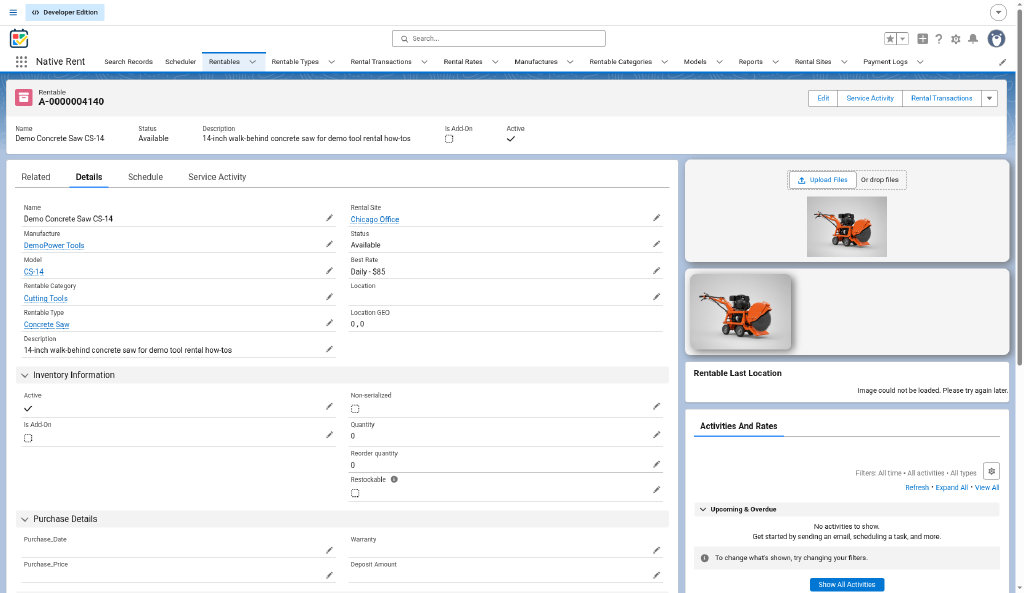
Packaging demo records (nativerent-dev-ed, 2026-10-24): Demo Concrete Saw CS-14 —
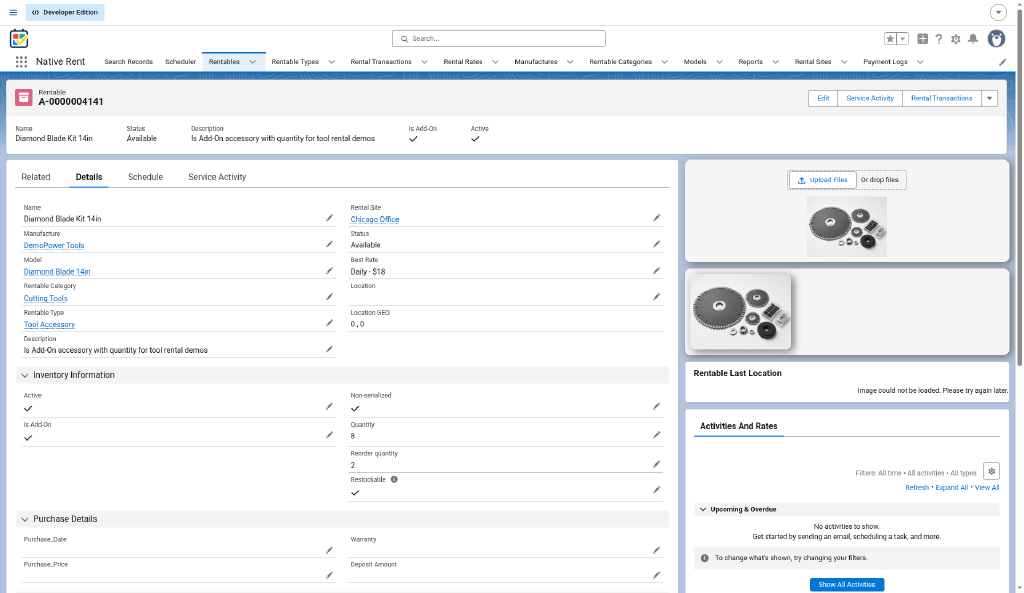
a01a500002VJZlcAAH(A-0000004140); Diamond Blade Kit 14in —a01a500002VJdvjAAD(A-0000004141, add-on). Manufacturer DemoPower Tools; Category Cutting Tools; Site Chicago Office.
What you'll do
- Do Part A once on the hub. Daily hire usually works date-only (Use Date and Time Off); turn it On if you rent by the hour.
- Part B: create a tool Rentable, its Daily rate, and post-rental fees.
- Part C: book → pay → check out → check in with a post-rental charge.
- Part D: Search, Scheduler, reports, part-based damage locations.
Part B — Build the data (tool example)
B1. Create Rentables
- Rentables → New. Name example:
Demo Concrete Saw CS-14. - Serialized tools: one Rentable each, Is Add-On off.
- Accessories sold/rented by count (blades, extension cords, cases): separate Rentable, Is Add-On on, set Quantity (example:
Diamond Blade Kit 14in, Quantity 8); tick Restockable if it should return to stock at check-in when the Check In version that reads Restockable is active. - Save. Chapter 3.
B2. Create Rental Rates
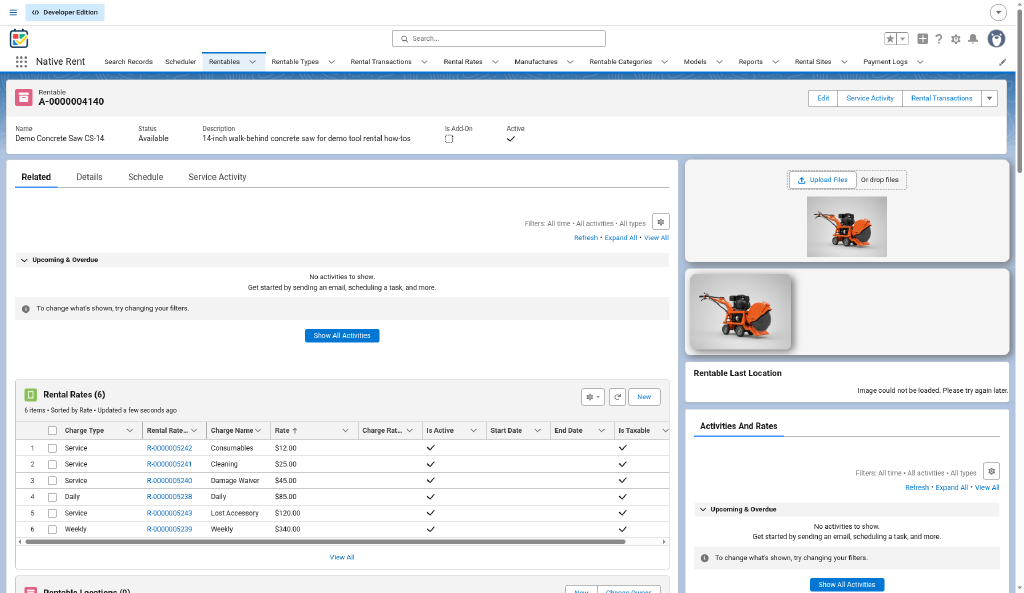
Daily rates are the common base. Example set for Demo Concrete Saw CS-14 (demo dollars — adjust for your price list):
| Charge Name | Charge Type | Example Rate | Charge Due | Notes |
|---|---|---|---|---|
| Daily | Daily | 85 (demo) | Base; mark Is Best Rate | |
| Weekly | Weekly | 340 (demo) | Longer hire | |
| Hourly | Hourly | optional | Only with date-and-time mode | |
| Tax | Tax | Charge % (e.g. 8) | Percent of taxable lines | |
| Cleaning | Service | your fee | Post-Rental | |
| Consumables | Service | Enter Qty | Post-Rental | Blades, fuel, fluids |
| Lost Accessory | Service | Enter Qty | Post-Rental | Missing case, blade, cord |
| Damage Waiver | Service | 45 (demo) | Pre-Rental | Same as the equipment checklist |
Post-rental rates: Charge Due must contain "Post" and Active must be true. Add-on accessories: one Daily rate (Diamond Blade Kit 14in: 18 demo). Chapter 4, chapter 7.
Note (source: QA 2026-10-24): the live Post-Rental Charges table columns are Charge Type / Rate / Rate Notes (not Charge Name); fee labels for these demos are in Rate Notes.
B3. Sanity check
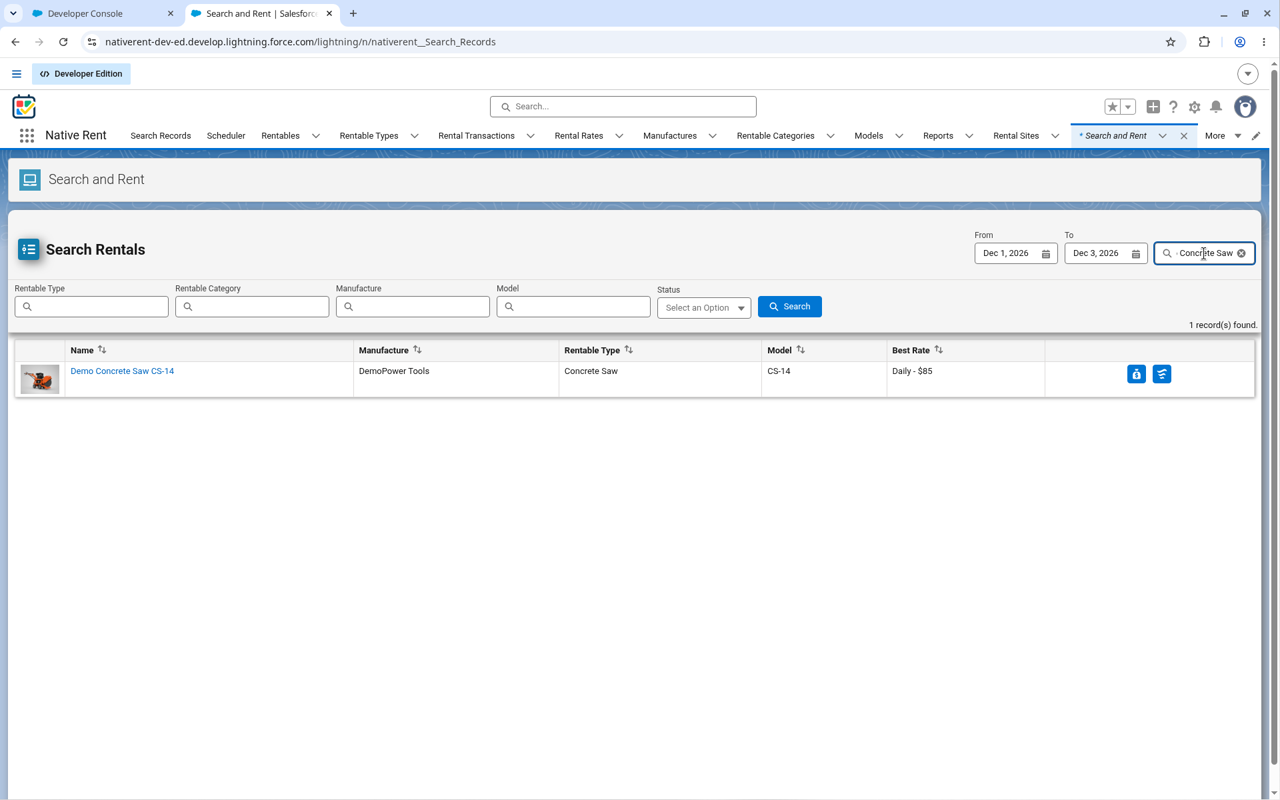
Tool Rentable has an Active Daily rate and appears in Search / Rentables list.
B4. Optional — classification
| Object | Tool example |
|---|---|
| Manufacturer | DemoPower Tools — useful for brand filters |
| Model | Model number; optional shared images (not required to book) |
| Rentable Category | Cutting Tools |
| Rentable Type | Saw, Mixer |
Part C — Working system smoke path
- Book — Start Rental (exact label can vary by Lightning page); Contact; dates; pick Demo Concrete Saw CS-14 plus Diamond Blade Kit 14in; Daily rate; confirm. Chapter 5.
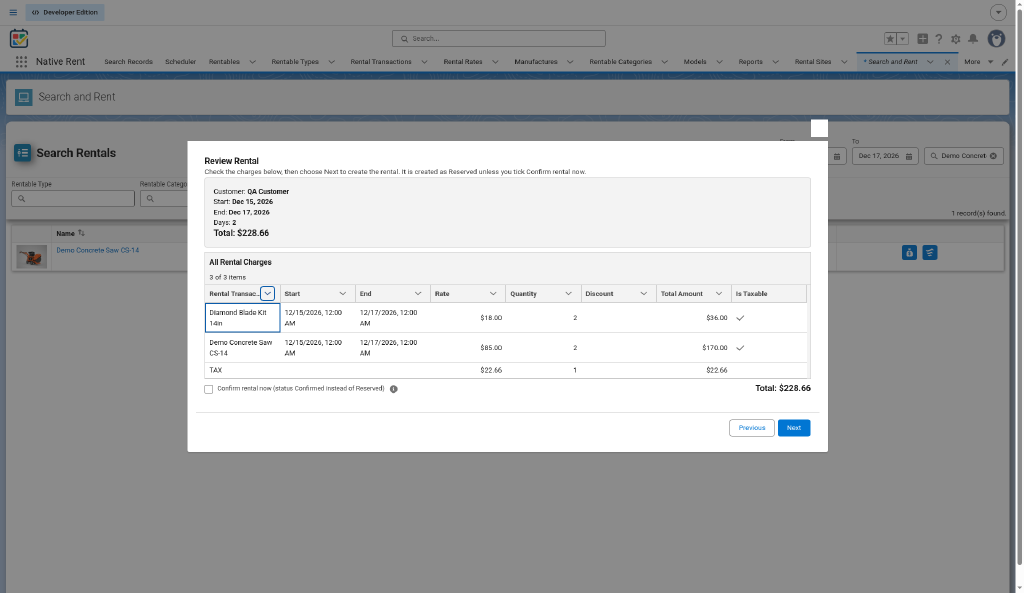
- Pay (optional) — NR_Payment_Screen; Payment Log row created. Chapter 8.
- Check out — Checkout_Process; lines → Checked Out. Chapter 9.
- Check in — CheckIn_Flow; extra time keeps the original Daily rate on the extra-time line; Damage Check with a part location (e.g. blade); pick Lost Accessory or Cleaning; finish → Completed. Damaged tool stays off rent until Ready for Rent. Chapter 10.
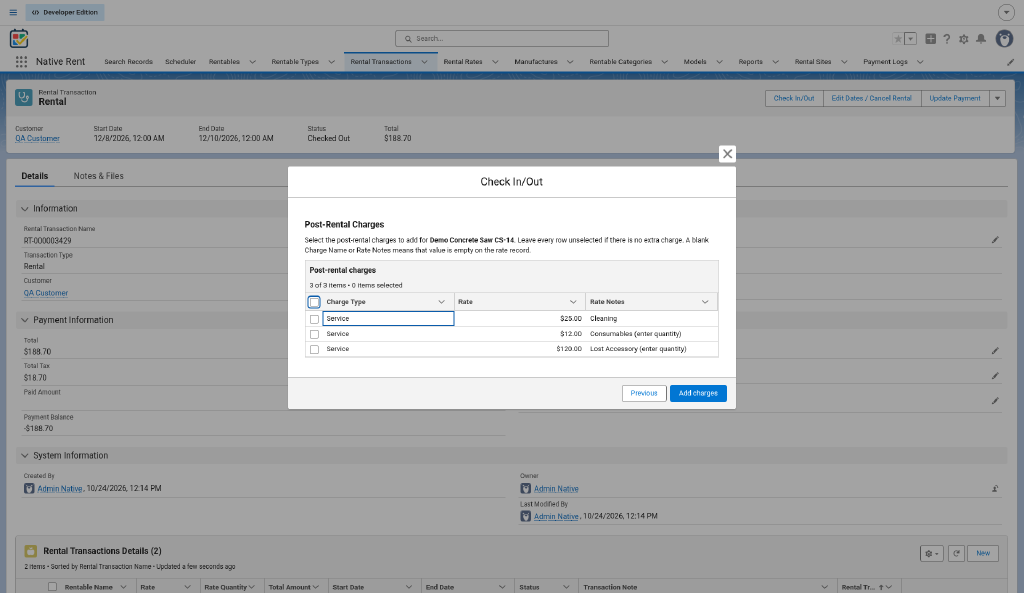
Note (source: QA 2026-10-24): the live Post-Rental Charges table columns are Charge Type / Rate / Rate Notes (not Charge Name); fee labels for these demos are in Rate Notes.
Checklist:
- [ ] Non-admin booked tool + accessory.
- [ ] Checkout and check-in completed; a post-rental charge was billed.
Warn: NR_Edit v17 — don't save date edits on rentals with multi-unit add-ons until the fix ships (relevant: accessory quantities).
Part D — Optional next
- Search Records / Scheduler (Native Planner) — chapter 14; org-specific Planner setup is outside this how-to.
- Reports — local ideas: tools out of service, accessories billed at return, late returns. Chapter 13.
- Damage_Location__c — add part values (blade, cord, housing, case) as subscriber picklist values; deactivate car values (Hood, Bumper, Windshield) by hand after the generic-picklist upgrade.
Related docs
Hub · User guide · Set up a Rentable and its rates · subscriber install notes
Still open
- Restockable stock return when that Check In version is active (see hub Still open).
- Per-rate Pro-Rating checkbox — not built; checkout email — not live yet.
- Example names and amounts are packaging-org demo values (see README); not list prices.
- Screenshots: QA shots under Images/howto/ (2026-10-24).
New to Native Rent?